
Lucky Roux Cards in One Piece TCG: Every Print, Every Price
Lucky Roux is a Original member of Shanks’ crew from the Red Hair Pirates supporting cast. Lucky Roux has very few prints across the entire One Piece TCG history. The OP09 alt-art is the chase; the rest are budget-tier prints. Niche character with thin pricing data. Across the One Piece TCG database, 4 Lucky Roux prints have current TCGPlayer prices, ranging from $0.11 to $31.90. This post is the full price ladder as of 2026-05-10, with explanations of what each tier represents.
Lucky Roux top 6 prints · top at $31.90 (4 priced prints tracked)
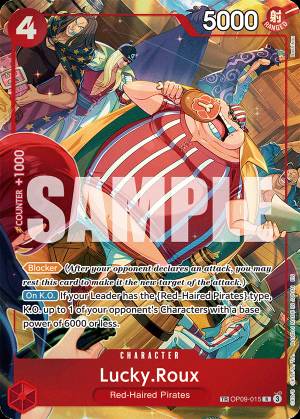
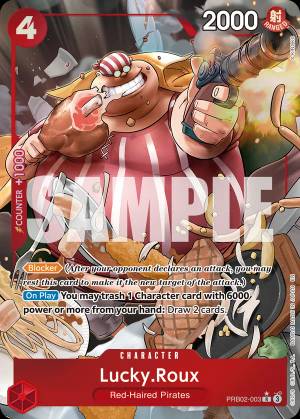
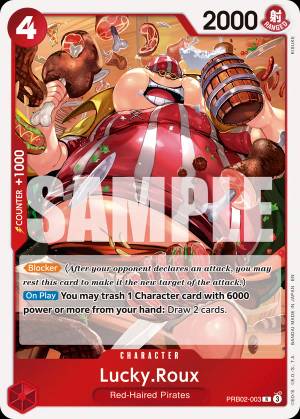
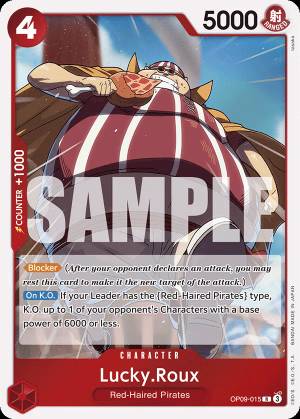
The full Lucky Roux price ladder
| Tier | Card | Code | Rarity | Price |
|---|---|---|---|---|
| Working | Lucky.Roux | OP09-015-v1 | AA | $31.90 |
| Working | Lucky.Roux | PRB02-003-v1 | AA | $7.26 |
| Working | Lucky.Roux | PRB02-003 | AA | $0.70 |
| Working | Lucky.Roux | OP09-015 | AA | $0.11 |
The chase tier
Lucky Roux doesn’t have a traditional chase-tier print today — the top print sits at $31.90. Watch newer sets for potential chase prints.
The mid tier
No mid-tier ($50-$200) prints currently. The pricing is bimodal: chase at the top, working tier below $50.
How Lucky Roux cards age
Lucky Roux has limited chase-tier demand. Most prints trade as completionist pickups rather than appreciation plays. Watch newer sets for potential alt-art releases that could shift the cluster.
Print disambiguation
The Haki app’s scanner identifies all Lucky Roux variants by their -v suffix automatically. For buyers verifying photos before paying, two checks:
- Variant suffix in the bottom-right rarity stamp. Real Bandai cards print the rarity badge with a slight emboss you can feel with a fingernail. Different
-vnumbers indicate different foil treatments and reprint runs. - Foil pattern direction. AA-rarity cards have a directional foil that runs at a specific angle. Different variants of the same card use different angles. If a listing’s photo doesn’t clearly show the foil, ask for a tilted photo before paying.
FAQ
How do I tell two Lucky Roux prints apart?
Check the full card code in the bottom-right corner. A code like OP05-022-v2 tells you the set (OP05), the card number (022), and the variant (-v2). All three together uniquely identify the print. Different variants of the same card identity have different prices ranging from $5 to $200+.
Are Lucky Roux cards being reprinted in newer sets?
Lucky Roux has not had heavy reprint activity. Most prints are confined to the original sets they shipped in.
What’s the cheapest entry point for a Lucky Roux collection?
Lucky.Roux (OP09-015) at $0.11. The lowest-priced AA-rarity Lucky Roux print currently in print.
Are Lucky Roux chase prints commonly faked?
Less commonly than top-tier chase characters, but the same authentication checks apply for any print above $100. See the counterfeit-detection checklist before paying.
Can I scan Lucky Roux cards with the Haki app?
Yes — the Haki TCG iOS scanner recognizes every Lucky Roux print in this list, including the variant code disambiguation. The scanner identifies cards in under one second and shows current TCGPlayer pricing immediately after the scan.
Related Articles
- Every Trafalgar Law Card in One Piece TCG, Ranked by Chase Value
Trafalgar Law has 30+ printings across One Piece TCG. Here's the value ladder from $76 to $850, with every print linked, sorted, and explained — pulled live from the Haki database.
- Anime 25th Collection (Luffy era) Cards in One Piece TCG: Every Print, Every Price
Anime 25th Collection (Luffy era) has 202+ printings across One Piece TCG. Here's the full ladder with current TCGPlayer USD prices, plus which prints to chase and which to skip.
- Miss Valentine (Mikita) Cards in One Piece TCG: Every Print, Every Price
Miss Valentine (Mikita) has 3+ printings across One Piece TCG. Here's the full ladder with current TCGPlayer USD prices, plus which prints to chase and which to skip.

Scan and track every One Piece TCG card.
Identify cards with the Haki TCG scanner, check live prices, build decks, and manage your collection.