
OP06 Wings of the Captain Set Guide: Every Chase, Every Price
Wings of the Captain (OP06) — set context: released March 2024, themed around supporting-cast and Captain-class characters across crews. Wings of the Captain is the supporting-cast set — Captain-class characters across multiple crews get fleshed out. The chase here is the AA-rarity cluster on iconic supporting characters; Luffy and Sabo prints anchor the high end.
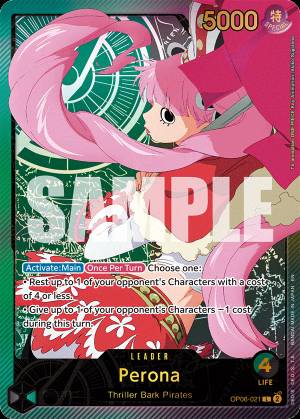
Wings of the Captain (OP06) is one of the deeper chase clusters in English One Piece TCG. 229 cards from the set currently trade above $0 on TCGPlayer; 18 of them sit above $100. The top card today is Perona (OP06-093-v2)** at $870.14**.
This is the actual price ladder pulled from the Haki database on 2026-05-10. Every card linked goes to its database entry with the most current TCGPlayer USD market price.
OP06 chase tier · top 6 by price
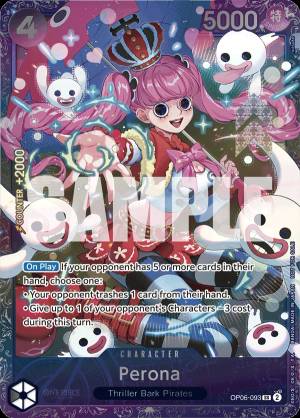
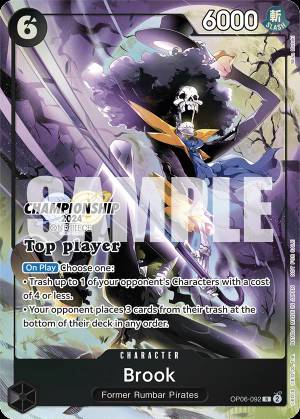
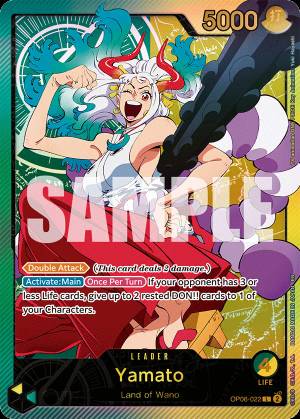
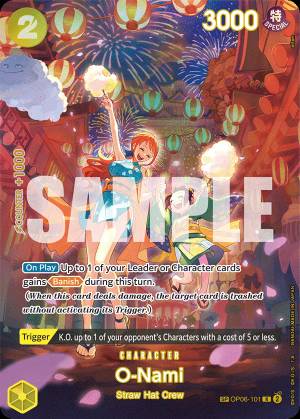
The chase tier
The top 5 character/event cards in OP06, by current price:
| Card | Code | Rarity | Price |
|---|---|---|---|
| Perona | OP06-093-v2 | AA | $870.14 |
| Brook | OP06-092-v1 | C | $400.00 |
| O-Nami | OP06-101-v2 | AA | $365.86 |
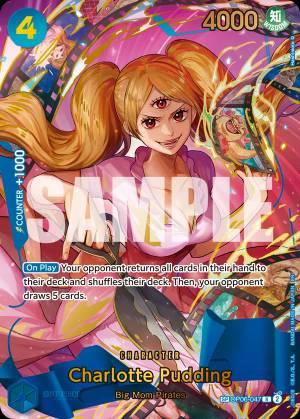
| Charlotte Pudding | OP06-047-v4 | FA | $298.01 |
| Shanks | OP06-007-v2 | AA | $260.15 |
Perona at $870.14 is the marquee non-Leader pull from this set.
The Leader cluster
OP06 shipped with 8 Leader cards in active circulation:
| Leader | Code | Colors | AA price |
|---|---|---|---|
| Yamato | OP06-022-v2 | Green / Yellow | $369.00 |
| Perona | OP06-021-v2 | Green / Black | $360.27 |
| Uta | OP06-001-v2 | Red / Purple | $296.84 |
| Vinsmoke Reiju | OP06-042-v2 | Blue / Purple | $261.61 |
| Gecko Moria | OP06-080-v2 | Black | $238.72 |
| Yamato | OP06-022-v1 | Green / Yellow | $87.64 |
The most-collected Leader from OP06 is Yamato at $369.00. Base-rarity (L) versions of every Leader trade between $0.50 and $5 — those are the play copies. The AA-rarity (-v1) prints in the table above are the chase versions for sleeve-and-display.
What I’d buy from OP06 today
Pragmatic picks for May 2026, given current prices and how the set has aged:
- Perona (
OP06-093-v2) at $870.14 - Brook (
OP06-092-v1) at $400.00 - Yamato (
OP06-022-v2) at $369.00
Three cards from the chase tier give you the cleanest exposure to this set without overcommitting to a single piece.
How OP06 compares to the major clusters
| Set | Top card | Top price | Cards above $100 |
|---|---|---|---|
| OP01 Romance Dawn | Mihawk MR | $899 | 11 |
| OP09 Emperors of the New World | Shanks AA | $967 | 9 |
| OP06 Wings of the Captain | Perona | $870.14 | 18 |
OP06 is among the deeper chase clusters in the game.
For broader market context across all sets, see the 10 most expensive One Piece cards in 2026.
FAQ
When does OP06 reprint?
Bandai’s English-language reprint cadence is 12–18 months after initial release. OP06 dropped March 2024, so reprint risk on chase prints is low; the set is past its typical reprint window.
Should I crack OP06 sealed product or buy singles?
Singles. Cracking has a flat expected value (you average out close to box cost in singles). If you specifically want the chase pull experience, buy one box; for everything else, the secondary market is more efficient.
What’s the most undervalued OP06 card right now?
O-Nami at $85.38. Mid-tier prints often track the chase tier upward when the set ages, and this one has clean character demand.
Are OP06 cards being reprinted in alt-art form in newer sets?
Newer Booster sets often include alt-art prints of characters first introduced in earlier sets. For OP06, watch for the chase character alt-arts in the next 2-3 set releases — these typically trade at 30–50% below the original OP06 chase prices.
How do I track OP06 prices over time?
The iOS app’s collection feature supports per-card price alerts. The full OP06 set page shows current prices for every card, sortable by color, rarity, and cost.
Can I scan OP06 cards with the Haki app?
Yes — the Haki TCG iOS scanner recognizes every OP06 print, including AA-rarity variant disambiguation (-v1, -v2, etc.). The scanner identifies cards in under one second and shows current TCGPlayer pricing immediately after the scan.
Related Articles
- OP02 Paramount War Set Guide: Every Chase, Every Price
Paramount War (OP02) released March 2023. Real prices, real codes, and what the cluster looks like in May 2026 — pulled live from the Haki database.
- OP03 Pillars of Strength Set Guide: Every Chase, Every Price
Pillars of Strength (OP03) released June 2023. Real prices, real codes, and what the cluster looks like in May 2026 — pulled live from the Haki database.
- OP04 Kingdoms of Intrigue Set Guide: Every Chase, Every Price
Kingdoms of Intrigue (OP04) released September 2023. Real prices, real codes, and what the cluster looks like in May 2026 — pulled live from the Haki database.

Scan and track every One Piece TCG card.
Identify cards with the Haki TCG scanner, check live prices, build decks, and manage your collection.