One Piece DON!! Cards: Identify the Version You Have
To identify a DON!! card, match its artwork, finish and product or event source with a specific catalog record. A character name such as “Zoro DON” is not enough. Two records can have the same title, and the catalog’s DON-... identifier may not appear on the physical card.
Compare the whole design, then check the finish and where the card came from. A regular Zoro DON!!, a foil version and a gold version can have different catalog records and prices. Keep an uncertain card separate until the reference image or product information resolves it.
What is a DON!! card?
DON!! cards are the game’s resources, separate from your main deck. Bandai’s official play guide specifies ten DON!! cards and explains using them to pay costs or give power to Leaders and Characters. The current rules cover their exact use and event requirements.
Artwork does not identify a different gameplay effect. For a collector, however, a regular design, foil treatment and event printing can be different items. Do not assume an oversized, custom or unofficial novelty card is acceptable at an event.
Artwork, finish and release
Collectors use descriptions such as character promo, foil, gold and prize DON!! to narrow their search. These are not a universal official rarity scale. A premium-looking finish does not establish print quantity, event origin or value. Match the record first and treat an unsupported seller label as unverified.
Start with the regular and foil Zoro cards, then compare the two Gold entries. Use a straight-on photo to match the artwork and lettering, and tilt your card under a light to check the finish. Buying from a listing? Ask for an angled photo when the finish isn’t visible.
 DON Card [Zoro] DON-8508086
 DON Card [Zoro Foil] DON-9127945
PriceCharting lists Zoro Gold (DON-8508085) under “One Piece Japanese Premium Booster.” TCGplayer lists Zoro Gold (DON-7807097) under “Premium Booster -The Best-.” Look at the bottom of the two images: the first has Japanese text, and the second reads “Your Turn +1000.” Then check which product matches the packaging or listing details you have. If both records still look plausible, wait for a better photo or more information before using either price.
Browse DON!! printings and prices
Open the DON!! set page to browse the records available in the site’s catalog, or use its checklist to review the versions you want to collect. A catalog checklist does not mean every printing was distributed in one product.
The table below shows selected PriceCharting and TCGplayer references in US dollars. Some versions on the set page have no tracked price.
| Card | Code | Rarity | TCGplayer (USD) | PriceCharting (USD) |
|---|---|---|---|---|
 DON Card [Zoro Gold] | DON-7807097 | PROMO | $762.77Observed | — |
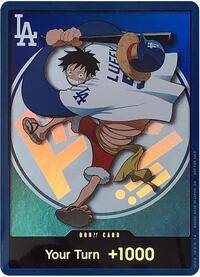 DON!! Card (LA Dodgers 2026 Promo) | DON-TCG696699 | PROMO | $476.40Observed | — |
 DON Card [Trafalgar Law Gold] | DON-7807218 | PROMO | $322.00Observed | — |
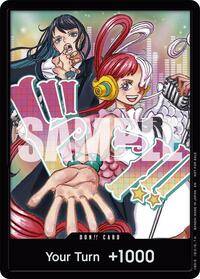 DON!! Card (One Piece Day Dallas 2025) | DON-TCG620097 | PROMO | $291.39Observed | — |
 DON Card [Donquixote Doflamingo Gold] | DON-7807102 | PROMO | $269.02Observed | — |
 DON!! Card [Yamato Gold] | DON-10856414 | PROMO | $258.55Observed | — |
 DON Card [Luffy Gold] | DON-8745038 | PROMO | $255.16Observed | — |
 DON!! Card [Nami Gold] | DON-10856383 | PROMO | $214.85Observed | — |
 DON!! Card (Judge Promo Championship 26-27) | DON-TCG719824 | PROMO | $212.41Observed | — |
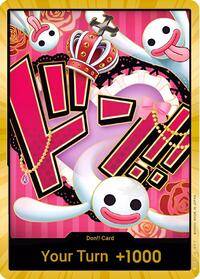 DON!! Card (Perona) (Gold) | DON-TCG586886 | PROMO | $206.22Observed | — |
Showing 10 of 431 priced printings.
Prices are market guides, not offers, and not investment advice.
Find a character’s DON!! cards
Use these shortlists to compare Ace, Nami, Uta, Zoro, Luffy and Boa Hancock designs. Open a record to inspect the image and full identifier. Similar names do not establish the same artwork, finish or release, and each shortlist shows only a selection of the matching records.
| Card | Code | Rarity | TCGplayer (USD) | PriceCharting (USD) |
|---|---|---|---|---|
 DON Card [Ace Gold] | DON-8315396 | PROMO | $203.10Observed | — |
 DON Card [Ace] | DON-7807116 | PROMO | $13.09Observed | — |
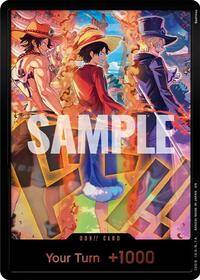 DON!! Card (English Version 3rd Anniversary Set) (Ace, Luffy, Sabo) | DON-TCG711010 | PROMO | $6.88Observed | — |
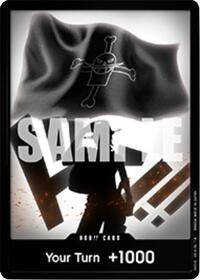 DON!! Card (Ace) (Special DON!! Set Vol. 2) | DON-TCG620149 | PROMO | $6.80Observed | — |
 DON!! Card [Portgas.D.Ace Devil Fruits Collection Vol. 2] | DON-8963611 | PROMO | $5.40Observed | — |
Showing 5 of 9 priced printings.
| Card | Code | Rarity | TCGplayer (USD) | PriceCharting (USD) |
|---|---|---|---|---|
| DON!! Card [Nami Gold] | DON-10856383 | PROMO | $214.85Observed | — |
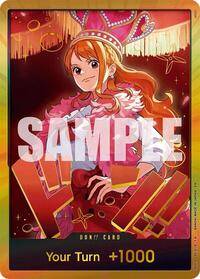 DON!! Card (Nami) (Gold) | DON-TCG677559 | PROMO | $60.42Observed | — |
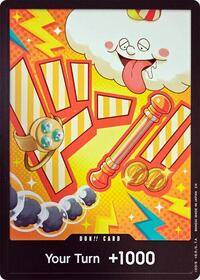 DON!! Card (Nami) | DON-TCG655898 | PROMO | $7.80Observed | — |
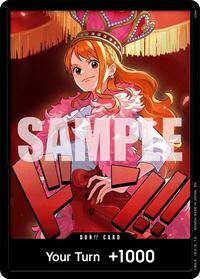 DON!! Card (Nami) | DON-TCG677560 | PROMO | $2.47Observed | — |
 DON!! Card [Nami Gold] | DON-10952014 | PROMO | — | $79.44Observed |
Showing 5 of 10 priced printings.
| Card | Code | Rarity | TCGplayer (USD) | PriceCharting (USD) |
|---|---|---|---|---|
 DON Card [Uta Gold] | DON-7807006 | PROMO | $165.03Observed | — |
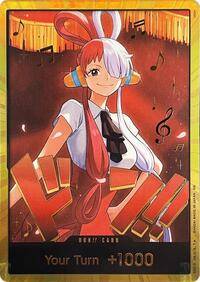 DON!! Card (Uta) (Gold) | DON-TCG677567 | PROMO | $28.87Observed | — |
 DON Card [Uta Foil] | DON-9127942 | PROMO | $9.02Observed | — |
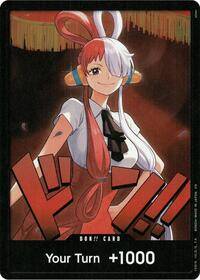 DON!! Card (Uta) | DON-TCG677566 | PROMO | $1.33Observed | — |
 DON!! Card [Ado & Uta] | DON-10338788 | PROMO | — | $329.37Observed |
Showing 5 of 10 priced printings.
| Card | Code | Rarity | TCGplayer (USD) | PriceCharting (USD) |
|---|---|---|---|---|
| DON Card [Zoro Gold] | DON-7807097 | PROMO | $762.77Observed | — |
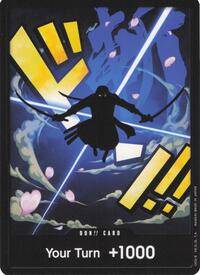 DON!! Card (Zoro) | DON-TCG593830 | PROMO | $25.48Observed | — |
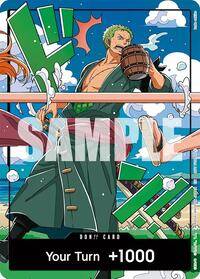 DON!! Card (World United) (Zoro) | DON-TCG712744 | PROMO | $8.94Observed | — |
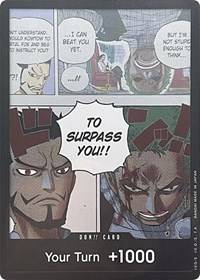 DON!! Card (Mihawk & Zoro) (Double Pack Set Vol. 3) | DON-TCG542683 | PROMO | $4.27Observed | — |
 DON Card [Zoro Gold] | DON-8508085 | PROMO | — | $275.32Observed |
Showing 5 of 10 priced printings.
| Card | Code | Rarity | TCGplayer (USD) | PriceCharting (USD) |
|---|---|---|---|---|
| DON Card [Luffy Gold] | DON-8745038 | PROMO | $255.16Observed | — |
 DON!! Card [Luffy Gear 5 Gold] | DON-10856364 | PROMO | $176.38Observed | — |
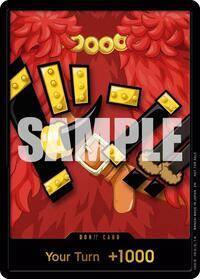 DON!! Card (Elbaph Luffy) (May Treasure Cup 2026) | DON-TCG702306 | PROMO | $119.50Observed | — |
 DON!! Card [Luffy Gear 4 Gold] | DON-10856371 | PROMO | $104.84Observed | — |
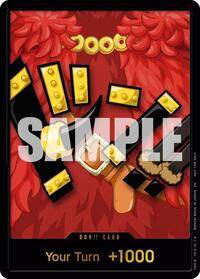 DON!! Card (Elbaph Luffy) | DON-TCG692132 | PROMO | $57.42Observed | — |
Showing 5 of 45 priced printings.
| Card | Code | Rarity | TCGplayer (USD) | PriceCharting (USD) |
|---|---|---|---|---|
 DON!! Card [Boa Hancock Gold] | DON-10856327 | PROMO | $153.36Observed | — |
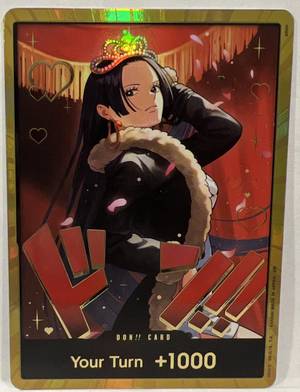 DON!! Card (Boa Hancock) (Gold) | DON-TCG677571 | PROMO | $64.11Observed | — |
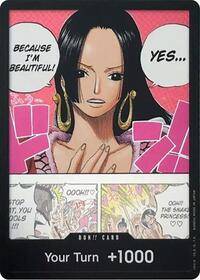 DON!! Card (Boa Hancock) (Double Pack Set Vol. 4) | DON-TCG557078 | PROMO | $10.34Observed | — |
 DON!! Card [Boa Hancock Foil] | DON-10856326 | PROMO | $8.53Observed | — |
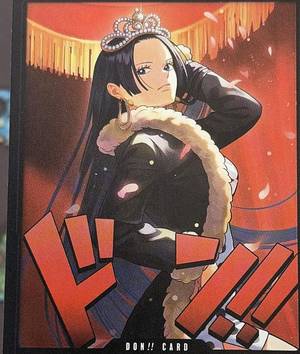 DON!! Card (Boa Hancock) | DON-TCG677570 | PROMO | $2.80Observed | — |
Showing 5 of 12 priced printings.
How to read the price references
- Match the printing first. A character name alone is not enough to select a price. Compare artwork, finish and release information on the linked card record.
- Read the provider and currency. To see how a price has changed, compare dated figures from the same source in the same currency.
- Check the observation date. A recently downloaded catalog can contain older price observations. An unavailable price date remains unknown.
- Compare like for like. A reference price does not establish your card’s condition, grading outcome or likely sale proceeds. Compare recent sales of the same printing and condition before agreeing a price.
The DON!! catalog brings together releases from different products and events. Its record count is not the size of one booster set, and adding every reference price would not value your own collection. Use the DON!! checklist to record the specific versions you own.
What moves a DON!! price?
Character demand, the documented release, finish, condition and available buyers all affect a comparison. An asking price is not a completed sale. Do not apply a Gold record’s value to a foil or regular card merely because the character matches.
For changes over time, use the dated price-trend method with the same printing, source and currency. To keep your own inventory consistent, record the confirmed printing in a collection.
FAQ
What is the most expensive DON!! card?
There is no single price that applies to every version of a DON!! design. Start with the selected references above, keep the provider and observation date attached, and verify the exact printing against recent sales. The largest reference in a catalog snapshot is not proof of the highest completed sale.
How many DON!! cards are there?
The game uses a ten-card DON!! deck, but collectors can choose from many artworks and finishes across products and events. The table summaries count matching records in Haki’s available catalog, not every printing ever released. Browse the DON!! checklist for the full available record list, including versions without a tracked price.
Are special DON!! cards playable?
Check the current official rules and event guidance for the actual card. Cosmetic artwork, a seller’s title and a database listing do not by themselves establish event eligibility.
What if I cannot tell two DON!! versions apart?
Keep the identification open. Request a clear front photo, an angled view of the treatment and the product context. Do not use a scanner match or a similar card’s price to fill the gap.
Related articles

Boa Hancock Cards in One Piece TCG: Printings and Tracked Prices
Compare every tracked Boa Hancock printing in the Haki One Piece TCG database, including card codes, sets, rarities, DON variants, exact-print links, and prices.
Cardmarket vs TCGplayer for One Piece Cards: Prices, Fees and Checks
Compare historical One Piece price figures, check exact printings and understand Cardmarket and TCGplayer fees before comparing checkout totals.

OP14 Azure Sea’s Seven: Printings and a May 2026 Price Snapshot
Compare selected OP14 printings using the preserved May 10, 2026 price snapshot, with exact-print checks, budget arithmetic and reprint limitations.
Haki TCG
Scan and organize your One Piece cards
Check the printing, review available TCGplayer and Cardmarket prices, and save cards to your collection in Haki.
- Card scanner
- Price references
- Collections and decks